Expert in SQl Server/MSBI(SSIS/SSAS/SSRS) and Power BI,Leading online/Corporate Trainer
Showing posts with label SQL. Show all posts
Sunday, June 5, 2016
Thursday, October 1, 2015
Monday, February 9, 2015
Oracle 11g/12c Course Content
Oracle
11g(SQL and Pl/SQL)
Introduction to DBMS:
• Approach to data management
• Introduction to prerequisites
• File and file system
• Disadvantages of file
• Review of database management terminology
• Database models
• Introduction to prerequisites
• File and file system
• Disadvantages of file
• Review of database management terminology
• Database models
- Hierarchal
model
- Network
model
- Relational
model
Introduction to RDBMS:
• Feature of RDBMS
• Advantages of RDBMS over FMS ad DBMS
• The 12 rules (E.F codd’s Rules – RDBMS)
• Need for database design
• Support of normalization process for data management
• Advantages of RDBMS over FMS ad DBMS
• The 12 rules (E.F codd’s Rules – RDBMS)
• Need for database design
• Support of normalization process for data management
- Client
server technology
- Oracle
corporation products
- Oracle
versions
• About SQL&SQL*PLUS
Sub language commands:
• Data definition language (DDL)
• Data retrieval language (DRL)
• Data manipulation language (DML)
• Transaction control language (TCL)
• Database security and privileges (DCL)
• Data retrieval language (DRL)
• Data manipulation language (DML)
• Transaction control language (TCL)
• Database security and privileges (DCL)
Introduction to SQL Database Object:
• Oracle predefined data types
• DDL Commands
• DDL Commands
- Create,
alter (add,modify,rename,drop)
- columns,
drop
• Working with DML,DRL Commands
• Operators support
• Operators support
- DML-Insert,update,delete
- DQL-SELECT
statements sing WHERE Clause
- Comparison
and conditional operations
- Arithmetic
and logical operations
- Set
operators (UNION, UNION ALL, INTERSECT, MINUS)
- Special
operators – IN (NOT IN),
- BETWEEN
(NOT BETWEEN), LIKE (NOT LIKE), IS NULL (IS NOT NULL)
Built in functions:
• Arithmetic functions, character functions, date
functions
• Aggregate functions, OLAP functions & general functions
Grouping the result of a query:
• Using group by and having clause of DRL statement
• Using order by clause
Working with integrity
constraints:
• Importance of data integrity
• Support of integrity constraints for relating table in RDBMS
• Working with different types of integrity constraints
• Support of integrity constraints for relating table in RDBMS
• Working with different types of integrity constraints
- NOT
NULL constraint
- UNIQUE
constraint
- PRIMARY
KEY constraint
- FOREIGN
KEY constraint
- CHECK
constraint
- REF
constraint
- Understanding
ON DELETE clause in referential integrity constraint
- Working
with composite constraint
- Applying
DEFAULT option to columns
- Working
with mujltiple constraints upon a colume
- Adding
constraints to a table
- Dropping
of constraints
- Enabling
for constraints
- Querying
for constraint information
Querying multiple table
(Joins):
• Equi join/inner join/simple join
• Cartesian join
• Non-equi join
• Outer joins
• Self join
• Cartesian join
• Non-equi join
• Outer joins
• Self join
Working with sub queries:
• Understanding the practical approach to sub
queries/nested select/sub select/inner
select/outer select
• What is the purpose of a sub query?
• Sub query principle and usage
• Type of sub queries
select/outer select
• What is the purpose of a sub query?
• Sub query principle and usage
• Type of sub queries
- Single
row
- Multiple
row
- Multiple
column
• Applying group functions in sub queries
• The impact of having clause in sub queries
• IN,ANY/SOME,ALL operators in sub queries
• PAIR WISE and NON PAIR WISE comparison in sub queries
• Be … aware of NULL’s
• Correlated sub queries
• Handling data retrieval with EXISTS and NOT EXISTS operators
Working with DCL,TCL commands:
• The impact of having clause in sub queries
• IN,ANY/SOME,ALL operators in sub queries
• PAIR WISE and NON PAIR WISE comparison in sub queries
• Be … aware of NULL’s
• Correlated sub queries
• Handling data retrieval with EXISTS and NOT EXISTS operators
Working with DCL,TCL commands:
• Grant, revoke
• Commit, rollback, savepoint
• SQL Editor commands
• SQL Environment settings
VIEWS in oracle:
• Commit, rollback, savepoint
• SQL Editor commands
• SQL Environment settings
VIEWS in oracle:
• Understanding the standards of VIEWS in
oracle
• Types of VIEWS
• Types of VIEWS
- Relational
views
- Object
views
• Prerequisites to work with views
• Practical approach of SIMPLE VIEWS and COMPLES VIEWS
• Column definitions in VIEWS
• Using VIEWS for DML operations
• In-line view
• Forced views
• Putting CHECK constraint upon VIEWS
• Creation of READ ONLY VIEWS
• Understanding the IN LINE VIEWS
• About materialized views
• View triggers
• Working with sequences
• Working with synonyms
• Working with index and clusters
• Creating cluster tables, implementing locks
Pseudo columns in oracle:
• Practical approach of SIMPLE VIEWS and COMPLES VIEWS
• Column definitions in VIEWS
• Using VIEWS for DML operations
• In-line view
• Forced views
• Putting CHECK constraint upon VIEWS
• Creation of READ ONLY VIEWS
• Understanding the IN LINE VIEWS
• About materialized views
• View triggers
• Working with sequences
• Working with synonyms
• Working with index and clusters
• Creating cluster tables, implementing locks
Pseudo columns in oracle:
• Understanding pseudo columns in oracle
• Types of pseudo columns in oracle
- CURRVAL
and NEXTVAL
- LEVEL
- ROWID
- ROWNUM
Data partitions & parallels process:
• Types of partitions
- Range
partitions
- Hash
partitions
- List
partition
- Composite
partition
- Parallel
query process
• Locks
- Row
level locks
- Table
level locks
- Shared
lock
- Exclusive
lock
- Dead
lock
SQL*Loader:
- SQL*Loader
architecture
- Data
file (Input datafiles)
- Control
file
- Bad
file
- Discard
file
- Log
file
- .txt
to base table
- .csv
to base table
- From
more than one file to single table
PL-SQL
• Introduction to programming languages
• Introduction to PL/SQL
• PL/SQL Architecture
• PL/SQL Data types
• Variable and constants
• Using built_in functions
• Conditional and unconditional statements
• Introduction to PL/SQL
• PL/SQL Architecture
• PL/SQL Data types
• Variable and constants
• Using built_in functions
• Conditional and unconditional statements
- Simple
IF,ELSIF, ELSE…IF
- Selection
case, simple case, GOTO label and EXIT
• Iterations in PL/SQL
- Simple
LOOP,WHILE LOOP,FOR LOOP and NESTED LOOPS
• SQL within PL/SQL
• Composite data types (complete)
Cursor management in PL/SQL
• Composite data types (complete)
Cursor management in PL/SQL
- Implicit
cursors
- Explicit
cursors
- Cursor
attributes
- Cursor
with parameters
- Cursors
with LOOPs
- Cursors
with sub queries
- Ref.cursors
• Record and PL/SQL Table types
Procedures in PL/SQL:
• STORED PROCEDURES
• PROCEDURE with prameters (IN,OUT and IN OUT)
• POSITIONAL Notation and NAMED Notation
• Procedure with cursors
• Dropping a procedure
• PROCEDURE with prameters (IN,OUT and IN OUT)
• POSITIONAL Notation and NAMED Notation
• Procedure with cursors
• Dropping a procedure
Functions in PL/SQL
• Difference between procedures and functions
• User defined functions
• Nested functions
• Using stored function in SQL statements
• User defined functions
• Nested functions
• Using stored function in SQL statements
Packages in PL/SQL:
• Creating PACKAGE specification and PACKAGE body
• Private and public objects in PACKAGE
• PL/SQL file I/O (input/output) using UTL_FILE package
EXCEPTIONS in PL/SQL:
Types of exceptions:
• User defined exceptions
• Pre defined exceptions
• RAISE_APPLICATION_ERROR
• PRAGMA_AUTONOMOUS_TRANSACTION
• SQL Error code values
• Pre defined exceptions
• RAISE_APPLICATION_ERROR
• PRAGMA_AUTONOMOUS_TRANSACTION
• SQL Error code values
Data base triggers in PL/SQL:
Types of triggers
• Row level triggers
• Statement level triggers
• DDL Triggers
• Trigger auditing
• Statement level triggers
• DDL Triggers
• Trigger auditing
Implementing object technology:
• What is object technology?
• OOPS-object instances
• Creation of objects
• Creating user defined data types
• Creating object tables
• Inserting rown in a table using objects
• Retrieving data from object based tables
• Calling a method
• Indexing abstract data type attributes
• OOPS-object instances
• Creation of objects
• Creating user defined data types
• Creating object tables
• Inserting rown in a table using objects
• Retrieving data from object based tables
• Calling a method
• Indexing abstract data type attributes
Using LOBS
• Large objects (LOBS)
• Creting tables-LOB
• Working with LOB values
• Inserting, updating & Deleting values in LOBs
• Populating lobis DBMS_LOB routines
• Using B-FILE
• Creting tables-LOB
• Working with LOB values
• Inserting, updating & Deleting values in LOBs
• Populating lobis DBMS_LOB routines
• Using B-FILE
Using collections
• Advantages of collection
• Ref cursor (dynamic cursor)
• Weak ref cursor
• Strong ref cursor
• Nested tables VARRAYS or VARYING arrays
• Creating tables using nested tables
• Inserting, updating & deleting nested table records
• Nested table in PL/SQL
• Ref cursor (dynamic cursor)
• Weak ref cursor
• Strong ref cursor
• Nested tables VARRAYS or VARYING arrays
• Creating tables using nested tables
• Inserting, updating & deleting nested table records
• Nested table in PL/SQL
Oracle data base
architecture
• Introduction to oracle database architecture
• Physical structures logical structures
• DB Memory structures background process
• 2tire, 3tire, N-tier architecture
Advanced features
• Physical structures logical structures
• DB Memory structures background process
• 2tire, 3tire, N-tier architecture
Advanced features
• Multiple inserts
• Insert all command
• Merge statement
• Temporary tables/global tables
• New function EXTRACT()
• Autonomous traction
• Pragma_autonomous_transaction()
• Returning into clause
• Bulk collect
• About flash back queries
• Dynamic SQL
• New 11g features
• Insert all command
• Merge statement
• Temporary tables/global tables
• New function EXTRACT()
• Autonomous traction
• Pragma_autonomous_transaction()
• Returning into clause
• Bulk collect
• About flash back queries
• Dynamic SQL
• New 11g features
Sunday, January 18, 2015
Indexs in SQL SERVER
INDEXES
Before discussing Indexes understand the below scenarios where we used to use daily operations.Scenario1
create table employee1
(
eid int primary key,
ename varchar(20)
)
we created a table with eid as primary key and ename columns.
insert into employee1 values(100,'srinivas')
--successfully inserted a record
select * from employee1
insert into employee1 values(80,'santosh')
--record inserted, now
select * from employee1
--will return as shown below
Why the records came in Ascending order ?
see the below two inserts
insert into employee1 values(105,'Ravi')
insert into employee1 values(76,'Ravi')
Now
select * from employee1
--will return as shown below
All the records are displaying in ascending order no all the records saving in ascending order in database.
Did you observe this behavior anytime ?
Scenario2:
create table employee2
(
eid int,
ename varchar(20)
)
I created the same table with out primary key on eid
insert into employee2 values(100,'srinivas'),(80,'santosh'),(105,'Ravi'),(76,'Ravi')
and inserted the same records now see the how the data will be stored on the table
is the data displaying in ascending order ?,the data is coming as we stored.
Did any time observed these two behaviours what is the reason?
Now understand the concept of Index first.
Indexes will be used for faster retrieval of data.In SQL Server we have two types of indexes are there as follows
1.Clustered Index (or) Unique Clustered Index:
1.We can have only one clustered index.
2.When ever you create a primary key, clustered index automatically you will get on that collumn.
with primary key ---->clustered index
with clustered index ---->we won't get primary key
3.If you have a clustered index/primary key physical order of records in table will change asc/desc
2. non clustered index (or) non unique clustered index:
1.we can have 249 non clustred index.
2.when ever you create a unique key non clustered index automatically u will get on that column
with unique ---->will get non clustered index
with non clustered index ---->we won't get unique key
3.non clustered index will not change the physical order but display the records in asc r desc order.
--------------------------------------------------------------------------------------------------------------------------
1.Creating an index:
create [unique][clustered/non clustered]
index <index_name> on
<table_name>(column_name [desc])
2.Droping an index:
drop index <table_name>.<index_name>
create table employee3
(
eid int,
ename varchar(20),
sal int
)
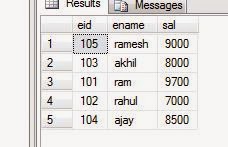
insert into employee3 values(105,'ramesh',9000),(103,'akhil',8000),(101,'ram',9700),(102,'rahul',7000),(104,'ajay',8500)
select * from employee3
you will get the data as follows
Now I am creating a clustered index on eid as follows
create clustered index myindex1 on employee3(eid)
Now
select * from employee3 will gets the data as follows
all the data is came in ascending order based on eid because we have a clustered index on eid.It changes the physical structure of a original data.
Now I want to drop the index
drop index employee3.myindex1
and now
select * from employee3
we got the same data even after droppping the index on eid because it changed the physical structure of the records.
Now we are creating a clustered index on sal
create clustered index myindex1 on employee3(sal)
select * from employee3
you will get the data as follows with sal ascending order.
Now we already having an index on sal and trying to create another index on eid as follows
create clustered index myindex2 on employee3(eid)
you will get the error as follows
as "Msg 1902, Level 16, State 3, Line 2
Cannot create more than one clustered index on table 'employee3'. Drop the existing clustered index 'myindex1' before creating another."
So you can't have more than one clustered index on a table if you want to keep more than one index use Non-clustered index.
(
eid int,
ename varchar(20),
sal int
)
insert into employee4 values(105,'ramesh',9000),(103,'akhil',8000),(101,'ram',9700),
(102,'rahul',7000),(104,'ajay',8500)
select * from employee4
you will get the data as follows
On employee4 table I am creating a non clustered index on eid as follows
create nonclustered index myindex2 on employee4(eid) include(ename,sal)
select * from employee4
Now you got the data in ascending order based on eid column because we have non clustered index on eid but it didnt change the physical order of records.
drop index employee4.myindex2
select * from employee4
Now I am creating non clustered index on all the three columns as follws
create nonclustered index myindex2 on employee4(eid) include(ename,sal)
create nonclustered index myindex3 on employee4(ename) include(eid,sal)
create nonclustered index myindex4 on employee4(sal) include(eid,ename)
select * from employee4
It displayed the records in ascending order based on sal.
Note:
****If we have number of non clustered indexs on what index basis you will get the data?
based on last index.
Now observe the below
select * from employee4 where sal>8000
we got the records in sal ascending order
on the same table
select * from employee4 where eid>100
we got the records in eid ascending order
If you have number of non clustered indexes and your select query contains where clause, on the column if we have an non clustered index we will get the data based on that index.
will continue with materilised view/indexed view.
Indexes will be used for faster retrieval of data.In SQL Server we have two types of indexes are there as follows
1.Clustered Index (or) Unique Clustered Index:
1.We can have only one clustered index.
2.When ever you create a primary key, clustered index automatically you will get on that collumn.
with primary key ---->clustered index
with clustered index ---->we won't get primary key
3.If you have a clustered index/primary key physical order of records in table will change asc/desc
2. non clustered index (or) non unique clustered index:
1.we can have 249 non clustred index.
2.when ever you create a unique key non clustered index automatically u will get on that column
with unique ---->will get non clustered index
with non clustered index ---->we won't get unique key
3.non clustered index will not change the physical order but display the records in asc r desc order.
--------------------------------------------------------------------------------------------------------------------------
1.Creating an index:
create [unique][clustered/non clustered]
index <index_name> on
<table_name>(column_name [desc])
2.Droping an index:
drop index <table_name>.<index_name>
creating a clustered index:
create table employee3
(
eid int,
ename varchar(20),
sal int
)
insert into employee3 values(105,'ramesh',9000),(103,'akhil',8000),(101,'ram',9700),(102,'rahul',7000),(104,'ajay',8500)
select * from employee3
you will get the data as follows
Now I am creating a clustered index on eid as follows
create clustered index myindex1 on employee3(eid)
Now
select * from employee3 will gets the data as follows
all the data is came in ascending order based on eid because we have a clustered index on eid.It changes the physical structure of a original data.
Now I want to drop the index
drop index employee3.myindex1
and now
select * from employee3
we got the same data even after droppping the index on eid because it changed the physical structure of the records.
Now we are creating a clustered index on sal
create clustered index myindex1 on employee3(sal)
select * from employee3
you will get the data as follows with sal ascending order.
Now we already having an index on sal and trying to create another index on eid as follows
create clustered index myindex2 on employee3(eid)
you will get the error as follows
as "Msg 1902, Level 16, State 3, Line 2
Cannot create more than one clustered index on table 'employee3'. Drop the existing clustered index 'myindex1' before creating another."
So you can't have more than one clustered index on a table if you want to keep more than one index use Non-clustered index.
Creating a Non-clustered index:
create table employee4(
eid int,
ename varchar(20),
sal int
)
insert into employee4 values(105,'ramesh',9000),(103,'akhil',8000),(101,'ram',9700),
(102,'rahul',7000),(104,'ajay',8500)
select * from employee4
you will get the data as follows
On employee4 table I am creating a non clustered index on eid as follows
create nonclustered index myindex2 on employee4(eid) include(ename,sal)
select * from employee4
Now you got the data in ascending order based on eid column because we have non clustered index on eid but it didnt change the physical order of records.
drop index employee4.myindex2
select * from employee4
we got the data in same order of how we insert.
Now I am creating non clustered index on all the three columns as follws
create nonclustered index myindex2 on employee4(eid) include(ename,sal)
create nonclustered index myindex3 on employee4(ename) include(eid,sal)
create nonclustered index myindex4 on employee4(sal) include(eid,ename)
select * from employee4
It displayed the records in ascending order based on sal.
Note:
****If we have number of non clustered indexs on what index basis you will get the data?
based on last index.
Now observe the below
select * from employee4 where sal>8000
we got the records in sal ascending order
on the same table
select * from employee4 where eid>100
we got the records in eid ascending order
will continue with materilised view/indexed view.
Thanks
Srinivas
9059361460
Labels:
clustered index,
Index,
MSBI,
MSBI jobs,
non clustered index,
PL/SQL,
SQL,
Sql Server 2000,
Sql Server 2005,
Sql Server 2008,
Sql Server 2008R2,
Sql Server 2012,
SSAS,
SSIS,
SSRS,
T-SQL,
tsql programming
Wednesday, December 10, 2014
Differences between and Stored Procedures and Functions
----------------------------------------------------------------------------------------------------------
Functions must return a value. Stored procedure may or not return values.
Functions Will allow only Select Procedures Can have select statements
statement, will not allow us to as well as DML statements insert,
use DML statements. update, delete.
Functions will allow only input Procedures can have both input
parameters,doesn’t support and output parameters.
output parameters.
Functions will not allow us to use For exception handling we can use
try-catch blocks. try catch blocks.
Transactions are not allowed within Can use transactions within Stored
functions. procedures.
We can use only table variables, Can use both table variables aswell as
it will not allow using temporary tables. temporary table in it.
Stored procedures can’t be called from Stored Procedures can call functions.
function.
Functions can be called from Procedures can’t be called from
select statement. Select/Where/Having etc statements.
Execute/Execstatement can be used to call/execute stored procedure.
UDF can be used in join clause as a result set. Procedures can’t be used in Join clause
Thanks
srinivas
Thursday, November 27, 2014
Set Operators in SQL SERVER
Set operators
Set Operators are used to join the results of two or more queries(two or more select statements).Set operators are used to join the records of two different tables where are as joins are used to join the columns of different tables.
To combine the results of two queries we need to follow the below basic rules
1.The number and teh order of the columns must be same in all the queries.
2.The datatypes must be compatible.
set operators are as follows:
1.union
2.union all
3.intersect
4.except
create table course1
(
coursename varchar(15),
)
insert into course1 values ('C++'),
('C#.net'),('asp.net'),('oracle'),('C')
create table course2
(
coursename varchar(15),
)
insert into course2 values ('vC++'),
('C#.net'),('asp.net'),('php'),('java')
1.UNION:
Combines the results of two or moew queries into a single result set,that includes all the rows that belong to all the queries in the union but it will return only distinct values.
Examples:
select Coursename from course1
UNION
select Coursename from course2
select Job from Employee10 where dno=10
UNION
select job from Employee10 where dno=20
UNION
select dno,ename,job from Employee10 where dno=20
2.UNION ALL
It is same as UNION but it will return duplicate values also.
Examples:
select Coursename from course1
UNION ALL
select Coursename from course2
select Job from Employee10 where dno=10
UNION ALL
select job from Employee10 where dno=20
Returns the common values from both of the result sets but here also it will return the distinct values.
Examples:
select Coursename from course1
INTERSECT
select Coursename from course2
select Job from Employee10 where dno=10
INTERSECT
select job from Employee10 where dno=20
4.EXCEPT
Here we will get the distinct values from left side table which are not available on right side table.
Examples:
select Coursename from course1
EXCEPT
select Coursename from course2
select eno,ename,Job from Employee10 where dno=10
EXCEPT
select dno,ename,job from Employee10 where dno=20
Let me know if you need any more information on this Article.
Thanks
Srinivas
Joins in SQL Server 2012
JOINS
Joins are used to display/retrieve values from one or more tables at a time.It is used to join the columns of different tables.
Types of Joins:
Joins are of below types
1.Inner Join
1.Equi Join
2.Non Equi Join
3.Self Join
2.Outer Join
1.Left outer Join
2.Right outer Join
3.Full outer Join
3.cross join or Cartesian join
1.Inner JOINS
It is used to join the tables containing matched or related records.
Ex: Equi Join,Non Equi Join,self join
1.Equi Join:
If two or more tables tables are combined using equality condition we call it as Equi Join.
Write a query to get the all the employee details along with their dept information
select E.enum,E.ename,e.Hiredate,e.Job,e.sal,e.comm,e.dno,
e.Mng,d.deptno,d.dname,d.loc
from Employee10 E,department10 d
where e.dno=d.deptno
The above query will retrieves the records from two tables but the syntax of joining the table is not in ANSI standard.to write joins in ANSI standard we need to follow two rules
1.We need to replace the "WHERE" with "ON"
2.We need to separate the tables in the from list with join keywords(Inner/self/left outer/right outer/full outer/cross Join)
So we can reframe the above select query as below
select E.enum,E.ename,e.Hiredate,e.Job,e.sal,e.comm,e.dno,
e.Mng,d.deptno,d.dname,d.loc
from Employee10 E INNER JOIN department10 d
ON e.dno=d.deptno
Both the queries results the same result.
* we will get only the matching records
* it will check for equality
2.Non Equi Join If two or more tables tables are combined using equality condition we call it as Equi Join.
Write a query to get the all the employee details along with their dept information
select E.enum,E.ename,e.Hiredate,e.Job,e.sal,e.comm,e.dno,
e.Mng,d.deptno,d.dname,d.loc
from Employee10 E,department10 d
where e.dno=d.deptno
The above query will retrieves the records from two tables but the syntax of joining the table is not in ANSI standard.to write joins in ANSI standard we need to follow two rules
1.We need to replace the "WHERE" with "ON"
2.We need to separate the tables in the from list with join keywords(Inner/self/left outer/right outer/full outer/cross Join)
So we can reframe the above select query as below
select E.enum,E.ename,e.Hiredate,e.Job,e.sal,e.comm,e.dno,
e.Mng,d.deptno,d.dname,d.loc
from Employee10 E INNER JOIN department10 d
ON e.dno=d.deptno
Both the queries results the same result.
* we will get only the matching records
* it will check for equality
If we join two tables other thans equlity condition we called this kind of join as NON Equi Join.
create table salgrades
(
sgrade int,
minsal int,
maxsal int)
insert into salgrades(sgrade,minsal,maxsal)
values(1,5000,8000),(2,8001,12000),(3,12001,16000),
(4,16001,18000),(5,18001,22000),(6,22001,28001)
Write a Query to get all the employees with their salary grade info
Normal Query
select e.enum,e.ename,e.sal,s.sgrade,s.minsal,s.maxsal
from Employ1000 e,salgrades s
where e.sal between s.minsal and s.maxsal
ANSI Standard
select e.enum,e.ename,e.sal,s.sgrade,s.minsal,s.maxsal
from Employ1000 e JOIN salgrades s
ON e.sal between s.minsal and s.maxsal
For Equi and Non Equi joins we need minimum of two tables.
3.SELF Join
A table can be joined by itself.
I want to get the emp details who have subordinates under them
Normal Query
select distinct e.enum,e.ename
from Employee10 e,Employee10 ee
where e.enum=ee.Mng
ANSI Standard
select distinct e.enum,e.ename
from Employee10 e JOIN Employee10 ee
ON e.enum=ee.Mng
I want to get the emp details who are not having subordinates under them
select distinct e.enum,e.ename
from Employee10 e JOIN Employee10 ee
ON ee.enum !=e.Mng
**Join/inner Join we can use any one both are same.
2.CARTESIAN/CROSS JOIN
If two or more tables are combined with each other without any condition we call it as CROSS\CARTESIAN join.Here each row of first table is joined with each row of second table.so we will get m*n rows as a result set.
NON ANSI Standard
select * from employee10,department10
ANSI Standard
select * from employee10 cross join department10
3.OUTER JOINS
It is an extension for the equi join that is in an equi join condition we are getting the matching records where as in outer joins we will get matching records with non matched records from left side,non matched records from right side or ,non matched records from left and right side.
We have three types of records in outer joins they are
1.Left outer Join
In left outer join we will get matching records from all the tables and non matched records from LEFT side table.
ex:
select e.enum,e.ename,e.sal,e.dno,d.deptno,d.dname,d.loc
from department10 d LEFT OUTER JOIN Employ1000 e
ON e.dno=d.deptno
We have three types of records in outer joins they are
1.Left outer Join
In left outer join we will get matching records from all the tables and non matched records from LEFT side table.
ex:
select e.enum,e.ename,e.sal,e.dno,d.deptno,d.dname,d.loc
from department10 d LEFT OUTER JOIN Employ1000 e
ON e.dno=d.deptno
2.Right outer Join
In Right outer join we will get matching records from all the tables and non matched records from RIGHT side table.
ex:
select e.enum,e.ename,e.sal,e.dno,d.deptno,d.dname,d.loc
from department10 d RIGHT OUTER JOIN Employ1000 e
ON e.dno=d.deptno
In Right outer join we will get matching records from all the tables and non matched records from RIGHT side table.
select e.enum,e.ename,e.sal,e.dno,d.deptno,d.dname,d.loc
from department10 d RIGHT OUTER JOIN Employ1000 e
ON e.dno=d.deptno
3.Full outer Join
In Full outer join we will get matching records from all the tables and non matched records from LEFT and RIGHT side tables.
ex:
In Full outer join we will get matching records from all the tables and non matched records from LEFT and RIGHT side tables.
ex:
select e.enum,e.ename,e.sal,e.dno,d.deptno,d.dname,d.loc
from department10 d FULL OUTER JOIN Employ1000 e
ON e.dno=d.deptno
from department10 d FULL OUTER JOIN Employ1000 e
ON e.dno=d.deptno
Let me know if you have any doubts on this article.
Thanks
Srinivas
Monday, November 24, 2014
Is operator in SQL SERVER
Is operator
Is operator is used to work with null values.Write a query to get all the employees whose Commission is null
select * from employee1 where comm is null
Write a query to get all the employees whose Commission is not null
select * from employee1 where comm is not null
Write a Query to get the total salary of an employee(comm+sal)
select ename,sal+isnull(comm,0) as Total_sal from employee1
Null with any operation is Null
Thanks
Srinivas
Between and Opearator in SQL SERVER
Between and Opearator
It is used to specify the range.Write a query to get all the employees whose ids are between 1002 to 1004
select * from employee1 where eid between 1002 and 1004
Write a query to get all the employees whose are hired on 2010
select * from employee1 where hiredate between '01-jan-2010' and '31-dec-2010'
Thanks
Srinivas
IN Operator in SQL SERVER
In Operator
By using where condition with assignment we cant give more than one value if we want to give more than one value in where clause we need to use In operator.Write a query to get the employee details whose eid is 1002 and 1004
select * from employee1 where eid=1002 or eid=1004’normal approach increases the validations if we give more values
Write a query to get the employee details whose eid is 1001,1003 and 1007
select * from employee1 where eid in (1001,1003,1007)
Write a query to get the employee details whose jobtitle is clerk and manager
select * from employee1 where jobtitle in ('clerk','manager')
If you want to use multiple values in where condition for comparisons like <,<=,>,>= we need to use ANY/ALL/SOME Operators
Thanks
Srinivas
Srinivas
Like Operator in SQL SERVER
Like Operator
It is used to work with the columns containing characters.In this operator 2 wild cards will be used._ (Underscore)to specify a single character
% to represent multiple characters
1.Write a Query to get the names starting with A
select ename from employee1
where ename like 'A%'
2.Write a query to get the employee details whose job title is containing manager
select * from employee1 where jobtitle like '%manager%'
3.Write a query to get the employee details whose job title is not containing manager
select * from employee1 where jobtitle not like '%manager%'
4.Write a query to get the employee details whose name contains second character as K
select * from employee1 where ename like '_k%'
Let me know if you have any doubts on this.
Thanks
Srinivas
Saturday, November 22, 2014
Constraints in SQL SERVER
Constraints
Constraints are used to give
conditions or rules on the table so that valid/meaning full data can be stored
in table.
·
If the constraint is given after the column name
and data type then it is called as column level constraint.
·
If the
constraint is given at the end of the table or after all the columns in the
table then it is called table level constraint.
·
If we want to give one constraint for two
columns in the table then table level constraint can be used.
Syntax:
constraint<constraint_name>
[unique/not null/primary key]
[check(condition)]
[foriegnkey(column) references
<table_name>(columnname)]
1.Unique
It will accepts new values and
will accepts one null value but it won’t accept duplicate values.
create table emp5
(
enointconstraint
eno_uni unique,
enamevarchar(10)
)
insert into emp5
values(100,'srinivas') ‘accepted because no row is
there in the table with eno 100
select * from emp5
insert into emp5
values(100,'srinivas')’invalidbecause we are inserting
second 100 value in eno
insert into emp5
values(101,'srinivas')’valid
insert into emp5
values(null,'srinivas')‘valid
insert into emp5
values(null,'srinivas')‘invalid-because we are
inserting second null value in eno
2.Not null
It will not accept null values but it will accept duplicate values.
Example:
create table emp6
(enointconstraint eno_NNul not null,
enamevarchar(10)
)
insert into emp6
values(100,'srinivas')‘valid
insert into emp6
values(100,'srinivas')’valid
insert into emp6
values(null,'srinivas')’in valid it won’t accept Null
value
3.PrimaryKey
It is a combination of
unique& not null constraint it will accept new values and will not accept
null values and duplicate values .A table can have only one Primary key.
Example:
create table emp7
(enointconstraint eno_PK primary key,
enamevarchar(10)
)
insert into emp7
values(100,'srinivas') ‘valid
insert into emp7
values(100,'srinivas') ‘in valid it wont accept
duplicate value
insert into emp7
values(null,'srinivas') ‘Invalid it wont accept null
value
4.Check:
Any type of condition can be
given by using check constraint.
***** complex validations it can’t perform,for that we
need to use triggers,constraint can look for the condition that we are
specified it won’t validate with existing data from database.
create table emp8
(
enoint constraint check_eno
check(eno>100 and eno<200),
enamevarchar(10)
)
insert into emp8
values(150,'srinivas')’valid
insert into emp8
values(250,'srinivas')’in valid failed at validation
insert into emp8
values(10,'srinivas')’in valid failed at validation
Giving multiple constraints to the table:
Example:
Create table emplist7
(
Enointconstraint prkey2 primary key,constrainteno_chk check(eno between
1000 and 2000),
Enamevarchar(10)
)
Insert into emplist7
values(1000,’Srinivas’)’valid
Insert into emplist7 values(1001,’Ajay’)’valid
The below insertions will be
failed:
Insert into emplist7 values(1001,’Suresh’)
Insert into emplist7 values(null,’Ravi)
Insert into emplist7 values(900,’Raj’)
5. Foriegn key:
It is used to create relation b/w tables and used to maintain
referential data integrity.
Example:
create table department
(
dnointconstraint dno_pk primary key,
dnamevarchar(10),
cityvarchar(10)
)
insert into department
values(10,'sales','hyderabad')
insert into department
values(20,'IT','Banglore')
select * from department
create table emp10
(
enointconstraint eno_primaryk primary key,
enamevarchar(10),
salint,
deptidintreferences department(dno)
)
insert into emp10 values(100,'srinivas',50000,30)’in valid
insert into emp10 values(100,'srinivas',50000,20)’valid
insert into emp10
values(100,'srinivas',50000,10)’invalid
select * from emp10
all the below insertions are
valid
insert into emp10 values(101,'satish',40000,10)
insert into emp10
values(102,'suresh',40000,20)
insert into emp10
values(103,'ramesh',40000,10)
select * from department
select * from emp10
delete from emp10
whereeno=103‘will delete the record from child table
delete from department
wheredno=20’it won’t delete the record from the parent table as it has
dependent records
If we want to delete/update the records
from parent table it is not possible because it is having dependency with child
table.
We need to use cascade delete and update to reflect the
changes with respect to parent table
On delete cascade:
If a parent record is deleted
from parent table all the related child records will be deleted from child
table.
On update cascade:
If a parent row is updated in
parent table then te related child rows will be updated in child table.
create table department1
(
dnointconstraint dno_pk primary key,
dnamevarchar(10),
cityvarchar(10)
)
Insert into
department1values(10,'sales','hyderabad')
Insert into
department1values(20,'IT','Banglore')
create table emp10
(
enointconstraint eno_primaryk primary key,
enamevarchar(10),
salint,
deptidintreferences department(dno) on delete cascade)
delete department1 where dno=10 ‘all the emp10 records from child table will be deleted.
Table level constraint:
create table emp12
(
enoint,
enamevarchar(10),
constraint tableunique(eno,ename)
)
insert into emp12
values(100,'srinivas')
100 srinivas
100 satish
The above tow are different
entries.
create table emp13
(
enoint,
enamevarchar(10),
constraint tableleve13 primary
key(eno,ename)
)
insert into emp13
values(100,'srinivas') ‘valid
insert into emp13
values(101,'srinivas')’valid
insert into emp13
values(101,'srinivas')’invalid
Composite key:
If primary key is given on two
columns in the table then it is called composite primary key. Composite means
mixed data (integers ,characters,and float values)
Let me know if there are any doubts on this article.
Thanks
Srinivas
Let me know if there are any doubts on this article.
Thanks
Srinivas
Friday, November 21, 2014
ANY/SOME/ALL Operators in SQL SERVER
ANY/SOME/ALL Operators
Any/all/some operators are used with sub queries when the inner querie returning more than one value.we use IN operator to compare the equality with multiple values, we can't perform the comparison operation with IN.
All operator implies the condition should satisfy all the values in the list,if any one value in the list not satisfied with condition entire condition failed
Write a query to get all the employees whose sal is less than all the salaries of dept 10.
select * from Employee10 where sal< all
(select sal from Employee10 where dno=10)
ANY and SOME are same,here the condition satisfy when any value in the list satisfies with the condition.
Write a querie to get all the employees whose sal is less than the max sal of dept 10
select * from Employee10 where sal< any
(select sal from Employee10 where dno=10)
select * from Employee10 where sal< some
(select sal from Employee10 where dno=10)
select * from employee10 where sal<
(select MAX(sal) from Employee10 where dno=10)
All the above 3 queries result the same values
Let me know if you have any doubts on this Query.
Thanks
Srinivas
Sub Queries in SQL SERVER
Sub Queries
Query within another Query is called sub query,Outer Query is called main Query and inner Query is called Sub Query.In sub queries first the inner query will execute and gives the result to the outer query for execution.
for an instance, If we want to get the employee details who is having highest salary it is not possible with normal query
select enum,ename,MAX(sal) from employee10
group by enum,ename
we can achieve that by using sub queries
select * from Employee10 where sal=
(select MAX(sal) from Employee10)
Write a query to get the second highest salary
select Max(sal) from Employee10
where sal<
(Select MAX(sal) from Employee10)
write a query to get all the employees whose sal is grater than avg sal of all the employees
select * from Employee10
where sal>
(select AVG(sal) from Employee10)
Write a query to the all the employees who are working from Hyderabad
select * from Employee10 where dno=(
select deptno from department10 where loc='hyderabad')
Write a query to het all the employees who are working under IT
select * from Employee10 where dno=(
select deptno from department10 where dname='IT')
Write a query to het all the employees who are working under IT,HR
select * from Employee10 where dno in (
select deptno from department10
where dname in ('IT','HR'))
Write a query to get the 4th Highest salary from employee table
select top 1 sal from
(select top 4 sal from Employee10
order by sal desc) S
order by sal IN valid when salaries having duplicate values so we need to use distinct keyword as shown below
select Top 1 sal from
(select distinct top 4 sal from Employee10
order by sal desc) s
order by sal
write a query to get all the employees whose sal is lessthan the maximum sal of employee working under dep 20
select * from Employee10 where sal<
(
select MAX(sal) from Employee10
where dno=20
)
Let me know if you have any doubts on this article
Thanks
Srinivas
Saturday, July 26, 2014
Excellent Opportunity for Oracle D2K or Pl/sql Professional for 1 - 3 years at Chain-Sys
Chain-Sys:
Chain-Sys is the fast growing Business Consulting and Product Development company with key expertise in Business Process Automation - Solutions. Our Operations launched in the year 1998 at Lansing, Michigan USA, supported by our Global Development Center in Chennai, INDIA. Our Global Business Operations is spread across UK, Singapore & US and National Operations across major metros like Chennai, Bangalore, Coimbatore, Mumbai & Delhi.
Candidate Profile:
* Min 1 + years of experience in any of the programming languages like PL/SQL,
forms & reports, D2k.
* Good in communication & interpersonal skills.
* Adaptable, learning nature.
* Should be willing to work in different project locations.
Job Description:
* Will be trained in development and customization of Oracle ERP.
* Will be trained in the implementation of Oracle ERP (R12 - E-business suite).
Pre-requisites:
* Minimum of 1 to 3 years exp
* Good communication skill
Location: Chennai
Interested candidates pls mail your Cv to sathish.ms@chain-sys.com with the below mentioned details asap
Name:
Exp:
Curr ctc:
Expected ctc:
Notice period:
Thanks
GVK Online Trainings- ADMIN TEAM
Chain-Sys is the fast growing Business Consulting and Product Development company with key expertise in Business Process Automation - Solutions. Our Operations launched in the year 1998 at Lansing, Michigan USA, supported by our Global Development Center in Chennai, INDIA. Our Global Business Operations is spread across UK, Singapore & US and National Operations across major metros like Chennai, Bangalore, Coimbatore, Mumbai & Delhi.
Candidate Profile:
* Min 1 + years of experience in any of the programming languages like PL/SQL,
forms & reports, D2k.
* Good in communication & interpersonal skills.
* Adaptable, learning nature.
* Should be willing to work in different project locations.
Job Description:
* Will be trained in development and customization of Oracle ERP.
* Will be trained in the implementation of Oracle ERP (R12 - E-business suite).
Pre-requisites:
* Minimum of 1 to 3 years exp
* Good communication skill
Location: Chennai
Interested candidates pls mail your Cv to sathish.ms@chain-sys.com with the below mentioned details asap
Name:
Exp:
Curr ctc:
Expected ctc:
Notice period:
Thanks
GVK Online Trainings- ADMIN TEAM
Subscribe to:
Posts (Atom)