Showing posts with label Sql Server 2008R2. Show all posts

Sunday, July 19, 2015

SCHEMAs in TSQL SQL SERVER

SCHEMA:

It is nothing but a logical container Under a database or we can group a set of objects under database by using a SCHEMA.

We can able to Create objects(Tables,views,procedures,functions,triggers etc) under a SCHEMA.

Creating a SCHEMA:

We can Create a schema by using the below syntax

syntax:

CREATE SCHEMA <SCHEMA_name>

Example:

CREATE SCHEMA SALES
CREATE SCHEMA EMPLOYEE

Creating an Object Under SCHEMA:

If we cant to Create an object under SCHEMA,we need to prefex the SCHEMA name before the object name as follows.

CREATE table SALES.TEST
 (
id int,
 name varchar(20)
 )

So we created the table called TEST under the SALES SCHEMA.

SELECT  * FROM TEST
--If  we used the above statement we will get an error that the object is not available,As the SQL server will look for a table under default SCHEMA dbo.So we need to write a Query as below.

SELECT  * FROM SALES.TEST

Like this we can Create any object under this SCHEMA and we can use it with SCHEMA.object Name where ever it requires.

Altering a SCHEMA:
we can Move an object from one SCHEMA to another by following the below syntax.

Syntax:

 ALTER SCHEMA <target_SCHEMA_name>
 transfer <source_SCHEMA_name.objectName>

example:

 ALTER SCHEMA SALES transfer dbo.dept

In the above example we are transfering the table dept from dbo SCHEMA to SALES SCHEMA,so that complete object willmove to SALES SCHEMA.

SELECT  * FROM  DEPT
 --in valid

SELECT  * FROM  SALES.DEPT
 --valid

Example 2:
Creating a view called VIEW1 in dbo SCHEMA as follows

 CREATE view VIEW1
 as
 select top 2 * from books

 SELECT  * FROM VIEW1

Transfering the view from dbo SCHEMA to SALES SCHEMA as folows

ALTER SCHEMA SALES transfer dbo.VIEW1

 SELECT  * FROM VIEW1
--in valid(throws an error)

 SELECT  * FROM SALES.VIEW1

Example 3:
Transfering an object from SALES SCHEMA to dbo SCHEMA(default)

ALTER SCHEMA dbo transfer SALES.TEST

 SELECT  * FROM TEST

 Droping a SCHEMA:

We can Drop the SCHEMA by using the below syntax

syntax:

 DROP SCHEMA <SCHEMA_name>

Example:

 DROP SCHEMA SALES
 --Cannot Drop SCHEMA 'SALES' because it is being referenced by object 'dept'.

NOTE:
 If we want to Drop a scehma we need to Drop all the objects unedr that SCHEMA or transfer all the obects to other scehmas and make the SCHEMA as empty then only we  can Drop a Schema.

I have two objects under the SALES Schema so i am unable to Drop the Schema.

 DROP view SALES.VIEW1
ALTER SCHEMA dbo transfer SALES.dept

I dropped one object under that Schema and trnsfered one object to another Schema and made the Schema empty now we are good to drop a Schema.

DROP SCHEMA SALES

Let me know if you need any more information on this.

Thanks
SQL SRINIVAS

Saturday, July 18, 2015

Working with Variables in TSQL Programming

Variable:

A variable is nothing but a memory location whch can hold a value inside it.At any point of time we can have one value in the varibale.

We can use that varibale's value as part of our program logic implementation and we can override the value with new value if required.

We have two types of variables,those are

1)Local variables: These are declared by developers the scope of the varibale is withing that block of code.It will be preceding with single @

2)Global Variables:These are already declared by SQL SERVER,developers can use these variables,the scope of the variables are Global. These varibales can identifyable with @@
  
Ex: @@Fetch_status

Working with Local variables:

Declaring a variable in SQL Server:

Syntax:

DECLARE @<variable_name> datatype[size]

Example:

DECLARE @a int
DECLARE @name varchar(20)
DECLARE @tdate Date

We can delcare multiple variables in a single statement as follows

DECLARE @a int
                    ,@name varchar(20)
                    ,@tdate Date

2)How to Assign a value to a variable

To assign a static value:

   SET @<ariable_name>=value/expression

   SET @a=100
   SET @tdate=GETDATE( )
   SET  @name='SRINIVAS'

To assign a values from table:

We can bring the values from table and assign it a variables by using the below approach

   SELECT @variable_name1=col1(col1_value),@variable_name2=col2(col2_value)
   from <remaining SELECT statement>

 Example:

 DECLARE @tename varchar(20)
 DECLARE @tesal int
 DECLARE @teno int
 SET @teno=1003
 SELECT @tename=ename,@tesal=esal from employee where eno=@teno

3)Printing a value:

From program we can print anything with the help of print statment.

PRINT <statement>

PRINT 'srinivas'

Example 1:

DECLARE @a int
DECLARE @b int
SET @a=100
SET @b=200
PRINT @a+@b

We can optimise the above statement as bellow ways

Method 1:

DECLARE @a int ,@b int
SET @a=100
SET @b=200
PRINT @a+@b

Method 2:
DECLARE @a int=100
DECLARE @b int=200
PRINT @a+@b

Method 3:

DECLARE @a int=100,
                   @b int=200
PRINT @a+@b

All the above four statements are correct and represents the same.

Example 2

Write a Query which will print the empname and salary of a given number.

DECLARE @tename varchar(20)
DECLARE @tesal int
DECLARE @teno int
SET @teno=1003
SELECT @tename=ename,@tesal=esal from employee where eno=@teno
PRINT @tename
PRINT @tesal

Way 2:

DECLARE @tename varchar(20)
                   ,@tesal int
                  ,@teno int=1003
SELECT @tename=ename,@tesal=esal from employee where eno=@teno
PRINT @tename
PRINT @tesal

Let me know if you need any more information on this.

Thanks
SQL SRINIVAS

Saturday, June 20, 2015

Priting a pyramid by using TSQL

Hi Team,

I have been observed that many of the interviews people are asking printing the pyramid like below by using SQL server.

 
So I am giving a script to that one

DECLARE @lclMaxLevel INT=5
DECLARE @lclPrintCount INT =0

WHILE @lclMaxLevel > 0
  BEGIN
      PRINT Space(@lclMaxLevel)
            + Replicate('*', @lclPrintCount)
            + Replicate('*', @lclPrintCount+1)

      SET @lclMaxLevel=@lclMaxLevel - 1
      SET @lclPrintCount=@lclPrintCount + 1
  END

Output as follows:

Let me know if you have any doubts on this.

Thanks
SQL Srinivas

Wednesday, June 10, 2015

***New MS SQL SERVER Development Batch from 16th June***

Team,

We are going to start a new batch for MS SQL SERVER development(TSQL &TSQLProgramming) on 16th June at 10-11 PM ISD.

Please find the below Course content

MS SQL SERVER DEVELOPMENT COURSE CONTENT

let your friends/relatives/colleagues, near and  dear know if any one are in need the same.

Thanks
ADMIN

Wednesday, June 3, 2015

***New MSBI SSAS Batch from 6th June***

Hi Team,

I am glad to inform you that we are going to start a new MSBI-SSAS(including MDX) batch on 6th June 2015.Please find the below details.

Batch Type-weekend(only on Sat and sunday)

Number of hours per day--3(3+3)

Prerequisites--Nothing(basic SQL is fine)

timings--6 to 9PM ISD

Number of hours- SSAS+MDX(15+7)--in max of 25 hours You will become experts in SSAS and MDX queries.

Let me know if you need any more information on this.

Thanks
Admin Team

Saturday, April 25, 2015

SQL Server Download Links for 2008 R2 and 2014

Find the Sql Server download links for windows7 and windows8 below.

Download links for Windows 7:

for windows 7-32 bit:

http://www.microsoft.com/en-in/download/details.aspx?id=26729

Open the above link as shown below and click on download


and select the download option as SQLEXPRADV_x86_ENU.exe  and click on 'Next' as shown below.


your download will start automatically.


for windows 7-64 bit:

http://www.microsoft.com/en-in/download/details.aspx?id=26729

Open the above link as shown below and click on download


and select the download option as SQLEXPRADV_x64_ENU.exe  and click on 'Next' as shown below.


your download will start automatically.

Download links for Windows 8/8.X+ versions:

for windows 8-32 bit:

http://www.microsoft.com/en-in/download/details.aspx?id=42299

Open the above link as shown below and click on download


In that click on download and select one item ExpressAdv 32BIT\SQLEXPRADV_x86_ENU.exe,and click on 'Next' as shown below.

your download will start automatically.

for windows 8-64 bit:

http://www.microsoft.com/en-in/download/details.aspx?id=42299

Open the above link as shown below and click on download


In that click on download and select one item Express 64BIT\SQLEXPR_x64_ENU.exe ,and click on 'Next' as shown below.
your download will start automatically.

Drop me a comment if you are facing any issue with download links.

Thanks
SQL Srinivas

Saturday, April 11, 2015

New SQL server Batches Information

HI Team,

Hope you people are doing well.

We are pleased to inform that we are going to start a new batches for SQL servevr development(TSQL ad TSQL programming)(SQl and Pl/SQl) from
Today-11th-Aprl-15--(11PM-12PM ISD )
Monday(13 th April-15--(7-8AM ISD)
Let me know if any one of you/your friends/relatives/colleagues interested.
Thanks
Admin

Sunday, January 18, 2015

Indexs in SQL SERVER

INDEXES

Before discussing Indexes understand the below scenarios where we used to use daily operations.

Scenario1

create table employee1
(
eid int primary key,
ename varchar(20)
)

we created a table with eid as primary key and ename columns.

insert into employee1 values(100,'srinivas')
--successfully inserted a record

select * from employee1

insert into employee1 values(80,'santosh')
--record inserted, now

select * from employee1 
--will return as shown below

Why the records came in Ascending order ?

see the below two inserts 

insert into employee1 values(105,'Ravi')

insert into employee1 values(76,'Ravi')

Now

select * from employee1 
--will return as shown below


All the records are displaying in ascending order no all the records saving in ascending order in database.

Did you observe this behavior anytime ?

Scenario2:

create table employee2
(
eid int,
ename varchar(20)
)

I created the same table with out primary key on eid

insert into employee2 values(100,'srinivas'),(80,'santosh'),(105,'Ravi'),(76,'Ravi')

and inserted the same records now see the how the data will be stored on the table


is the data displaying in ascending order ?,the data is coming as we stored.

Did any time observed these two behaviours what is the reason?

Now understand the concept of Index first.

Indexes will be used for faster retrieval of data.In SQL Server we have two types of indexes are there as follows

1.Clustered Index (or) Unique Clustered Index:

1.We can have only one clustered  index.
2.When ever you create a primary key, clustered index automatically  you will get on that collumn.

with primary key ---->clustered index
with clustered index ---->we won't get primary key

3.If you have a clustered index/primary key  physical order of records in table will change asc/desc


2. non clustered index (or)  non unique clustered index:


1.we can have 249 non clustred  index.
2.when ever you create a unique key non clustered index automatically u will get  on that column

with unique ---->will get non clustered index
with non clustered index ---->we won't get unique key

3.non clustered index will not change the physical order but display the records in asc r desc order.
--------------------------------------------------------------------------------------------------------------------------
1.Creating an index:

create [unique][clustered/non clustered]
index <index_name> on 
<table_name>(column_name [desc])

2.Droping  an index:

drop index <table_name>.<index_name>

creating a clustered index:

create table employee3
(
eid int,
ename varchar(20),
sal int
)

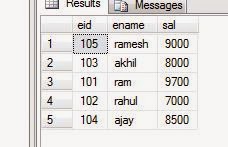
insert into employee3 values(105,'ramesh',9000),(103,'akhil',8000),(101,'ram',9700),(102,'rahul',7000),(104,'ajay',8500)

select * from employee3
you will get the data as follows


Now I am creating a clustered index on eid as follows

create clustered index myindex1 on employee3(eid)

Now 
select * from employee3 will gets the data as follows


all the data is came in ascending order based on eid because we have a clustered index on eid.It changes the physical structure of a original data.

Now I want to drop the index

drop index employee3.myindex1
and now

select * from employee3


we got the same data even after droppping the index on eid because it changed the physical structure of the records. 

Now we are creating a clustered index on sal

create clustered index myindex1 on employee3(sal)

select * from employee3

you will get the data as follows with sal ascending order.


Now we already having an index on sal and trying to create another index on eid as follows

create clustered index myindex2 on employee3(eid)

you will get the error as follows


as "Msg 1902, Level 16, State 3, Line 2
Cannot create more than one clustered index on table 'employee3'. Drop the existing clustered index 'myindex1' before creating another."

So you can't have more than one clustered index on a table if you want to keep more than one index use Non-clustered index.

Creating a Non-clustered index:
create table employee4
(
eid int,
ename varchar(20),
sal int
)

insert into employee4 values(105,'ramesh',9000),(103,'akhil',8000),(101,'ram',9700),
(102,'rahul',7000),(104,'ajay',8500)


select * from employee4 

you will get the data as follows


On employee4 table I am creating a non clustered index on eid as follows

create nonclustered index myindex2 on employee4(eid) include(ename,sal)

select * from employee4


Now you got the data in ascending order based on eid column because we have non clustered index on eid but it didnt change the physical order of records.

drop index employee4.myindex2

select * from employee4

we got the data in same order of how we insert.

Now I am creating non clustered index on all the three columns as follws

create nonclustered index myindex2 on employee4(eid) include(ename,sal)

create nonclustered index myindex3 on employee4(ename) include(eid,sal)

create nonclustered index myindex4 on employee4(sal) include(eid,ename)

select * from employee4


It displayed the records in ascending order based on sal.

Note:

****If we have number of non clustered indexs on what index basis you will get the data?
based on last index.

Now observe the below

select * from employee4 where sal>8000
we got the records in sal ascending order

on the same table

select * from employee4  where eid>100

we got the records in eid ascending order

If you have number of non clustered indexes and your select query contains where clause, on the column if we have an non clustered index we will get the data based on that index.


will continue with materilised view/indexed view.

Thanks
Srinivas
9059361460

Sunday, December 28, 2014

SQL Server 2014 Course Content

SQL Server 2014 Training Course Overview
SQL Server Training Course Prerequisite
  • No Prior Experience is required
SQL Server Training Course Duration
  • 40 Working days, daily one hour
SQL Server 2014 Training Course Overview

Introduction To DBMS
·         File Management System And Its Drawbacks
·         Database Management System (DBMS) and Data Models
·         Relationships in Sql Server

Introduction To SQL Server
·         Advantages and Drawbacks Of SQL Server Compared To Oracle And DB2
·         SQL Server Installation.
·         Connecting To Server
·         Server Type
·         Server Name
·         Authentication Modes
·         Sql Server Authentication Mode
·         Windows Authentication Mode
·         Login and Password
·         Sql Server Management Studio and Tools In Management Studio
·         Object Explorer
·         Object Explorer Details
·         Query Editor
TSQL (Transact Structured Query Language)
Introduction To TSQL
·         History and Features of TSQL
·         Types Of TSQL Commands
·         Data Definition Language (DDL)
·         Data Manipulation Language (DML)
·         Data Query Language (DQL)
·         Data Control Language (DCL)
·         Transaction Control Language (TCL)

Data Definition Language(DDL)
·         Database
·         Creating Database
·         Altering Database
·         Deleting Database
·         Constrains
·         Procedural Integrity Constraints
·         Declarative Integrity Constraints
·         Not Null, Unique, Default and Check constraints
·         Primary Key and Referential Integrity or foreign key constraints
·         Delete and update Rules in Foreign Key
1.     On update/delete no action
2.     On update/delete cascade
3.     On update/delete set null
4.     On update/delete set default

·         Data Types In TSQL
·         Table
·         Creating Table
·         Altering Table
·         Dropping Table
Data Manipulation Language(DML)
·         Insert
·         Identity
·         Creating A Table From Another Table
·         Inserting Rows From One Table To Another
·         Update
·         Computed Columns
·         Delete
·         Truncate
·         Differences Between Delete and Truncate
·         Merge Statement
Data Query Language (DQL)
·         Select
·         Where clause
·         Order By Clause
·         Distinct Keyword
·         Isnull() function
·         Column & table aliases
Operators:
·         Arithmetic operators
·         comparison operators
·         range operators
·         list operators
·         string /pattern matching operator
·         unknown value operators
·         logical operators
·         set operators
Built In Functions
·         Scalar Functions
·         Numeric Functions
·         Character Functions
·         Conversion Functions
·         Date Functions
Aggregate Functions
·         Convenient Aggregate Functions
·         Statistical Aggregate Functions
·         Group By and Having Clauses
·         Super Aggregates
·         Over(partition by …) Clause
·         Ranking Functions
v  Rank()
v  Dense_rank()
v  Row_Number()
v  Ntile(n)
Table Expressions

·         Derived tables
·         Common Table Expressions (CTE)
Top n Clause
Joins
·         Inner Join
·         Equip Join
·         Non-Equi Join
·         Self Join
·         Outer Join
·         Left Outer Join
·         Right Outer Join
·         Full Outer Join
·         Cross Join
Sub Queries
·         Single Row Sub Queries
·         Multi Row Sub Queries
·         Any or Some
·         ALL
·         Nested Sub Queries
·         Co-Related Sub Queries
·         Exists and Not Exists
Indexes
·         Clustered Index
·         NonClustered Index
·         Create , Alter and Drop Indexes
·         Creating indexed view
·         Using Indexes
Security
·         Login Creation
·         SQL Server Authenticated Login
·         Windows Authenticated Login
·         User Creation
·         Granting Permissions
·         Revoking Permissions
Schema
·         Creating a schema
·         Creating an object under schema
·         Alterring a schema
·         Droping a schema
·         Providing security to schemaa
Views
Purpose Of Views
·         Creating , Altering and Dropping Views
·         Simple and Complex Views
·         Updating(insert/delete/update)  the views
·         With check option
·         Encryption and Schema Binding Options in creating views
Transaction Management-(TCL)
 Introduction
·         Explicit Transactions
·         Begin Transaction
·         Commit Transaction
·         Rollback Transaction
·         Save Transaction
·         Implicit Transactions
TSQL Programming (like PL/SQL in Oracle)
·         Drawbacks Of TSQL that leads to TSQL Programming
·         Introduction To TSQL Programming
·         Control statements In TSQL Programming
·         Conditional Control Statements
·         If
·         Case
·         Looping Control Statements
·         While
Cursors
·         Working With Cursors
·         Types Of Cursors
·         Forward_Only and Scroll Cursors
·         Static, Dynamic and Keyset Cursors
·         Local and Global Cursors
·         Cursors with functions, procedures and triggers(will be dealt at the end)
Stored Sub Programs
·         Advantages Of Stored Sub Programs compared to Independent SQL Statements
·         Stored Procedures
·         Creating , Altering and Dropping
·         Optional Parameters
·         Input and Output Parameters
·         Permissions on Stored Procedures
·         User Defined Functions
·         Creating, Altering and Dropping
·         Types Of User Defined Functions
·         Scalar Functions
·         Table Valued Functions
·         Inline Table Valued Functions
·         Multi Statement Table Valued Functions
·         Permissions On User Defined Functions
·         Diff between fucntions and procedures
·         Triggers
·         Purpose of Triggers
·         Differences Between Stored Procedures and User Defined Functions and Triggers
·         Creating, Altering and Dropping Triggers
·         After Triggers
·         Magic Tables
·         Instead Of Triggers
·         Updating the complex view using instead of triggers
·         Exception Handling
·         Implementing Exception Handling
·         Try –catch mechanism
·         Adding and removing User Defined Error Messages To And From SQL Server Error Messages List
·         Raising Exceptions Manual
·         Generating Errors through throws key word
Normalization
·         First Normal Form
·         Second Normal Form
·         Third Normal Form
·         Boyce-Codd Normal Form

Backup and Restore Of Database
Attach and Detach of Database
Thanks
Srinivas
 9059361460
srinivas.r.salesforce@gmail.com