Monday, November 24, 2014

Is operator in SQL SERVER

Is operator

Is operator is used to work with null values.

Write a query to get all the employees whose Commission is null
select * from employee1 where comm is null

Write a query to get all the employees whose Commission is not null
select * from employee1 where comm is not null

Write a Query to get the total salary of an employee(comm+sal)
select ename,sal+isnull(comm,0) as Total_sal from employee1

Null with any operation is Null

Thanks
Srinivas

Between and Opearator in SQL SERVER

Between and Opearator

It is used to specify the range.


Write a query to get all the employees whose ids are between 1002 to 1004
select * from employee1 where eid between 1002 and 1004

Write a query to get all the employees whose are hired on 2010
select * from employee1 where hiredate between '01-jan-2010' and '31-dec-2010'

Thanks
Srinivas

IN Operator in SQL SERVER

In Operator

By using where condition with assignment we cant give more than one value if we want to give more than one value in where clause we need to use In operator.

Write a query to get the employee details whose eid is 1002 and 1004

select * from employee1 where eid=1002 or eid=1004’normal approach increases the validations if we give more values

Write a query to get the employee details whose eid is 1001,1003 and 1007
select * from employee1 where eid in (1001,1003,1007)

Write a query to get the employee details whose jobtitle is clerk and manager
select * from employee1 where jobtitle in ('clerk','manager')

If you want to use multiple values in where condition for comparisons like <,<=,>,>= we need to use ANY/ALL/SOME Operators


Thanks
Srinivas

Like Operator in SQL SERVER

Like Operator

It is used to work with the columns containing characters.In this operator 2 wild cards will be used.

_ (Underscore)to specify a single character 
% to represent multiple characters

1.Write a Query to get the names starting with A

select ename from employee1
where ename like 'A%'

2.Write a query to get the employee details whose job title is containing manager

select * from employee1 where jobtitle like '%manager%'

3.Write a query to get the employee details whose job title is not containing manager

select * from employee1 where jobtitle not like '%manager%'

4.Write a query to get the employee details whose name contains second character as K

select * from employee1 where ename like '_k%'

Let me know if you have any doubts on this.

Thanks
Srinivas

Saturday, November 22, 2014

Constraints in SQL SERVER


Constraints
Constraints are used to give conditions or rules on the table so that valid/meaning full data can be stored in table.
·         If the constraint is given after the column name and data type then it is called as column level constraint.
·          If the constraint is given at the end of the table or after all the columns in the table then it is called table level constraint.
·         If we want to give one constraint for two columns in the table then table level constraint can be used.

Syntax:

constraint<constraint_name>
[unique/not null/primary key]
[check(condition)]
[foriegnkey(column) references <table_name>(columnname)]

1.Unique
It will accepts new values and will accepts one null value but it won’t accept duplicate values.

create table emp5
(
enointconstraint eno_uni unique,
enamevarchar(10)
)

insert into emp5 values(100,'srinivas') ‘accepted because no row is there in the table with eno 100

select * from emp5

insert into emp5 values(100,'srinivas')’invalidbecause we are inserting second 100 value in eno

insert into emp5 values(101,'srinivas')’valid

insert into emp5 values(null,'srinivas')‘valid

insert into emp5 values(null,'srinivas')‘invalid-because we are inserting second null value in eno

2.Not null

It will not accept null values but it will accept duplicate values.

Example:
create table emp6
(enointconstraint eno_NNul not null,
enamevarchar(10)
)

insert into emp6 values(100,'srinivas')‘valid
insert into emp6 values(100,'srinivas')’valid
insert into emp6 values(null,'srinivas')’in valid it won’t accept Null value


3.PrimaryKey
It is a combination of unique& not null constraint it will accept new values and will not accept null values and duplicate values .A table can have only one Primary key.
Example:
create table emp7
(enointconstraint eno_PK primary key,
enamevarchar(10)
)

insert into emp7 values(100,'srinivas') ‘valid
insert into emp7 values(100,'srinivas') ‘in valid it wont accept duplicate value
insert into emp7 values(null,'srinivas') ‘Invalid it wont accept null value

4.Check:
Any type of condition can be given by using check constraint.
***** complex validations it can’t perform,for that we need to use triggers,constraint can look for the condition that we are specified it won’t validate with existing data from database.

create table emp8
(
enoint constraint check_eno check(eno>100 and eno<200),
enamevarchar(10)
)

insert into emp8 values(150,'srinivas')’valid
insert into emp8 values(250,'srinivas')’in valid failed at validation
insert into emp8 values(10,'srinivas')’in valid failed at validation

Giving multiple constraints to the table:
Example:
Create table emplist7
(
Enointconstraint prkey2 primary key,constrainteno_chk check(eno between 1000 and 2000),
Enamevarchar(10)
)
Insert into emplist7 values(1000,’Srinivas’)’valid
Insert into emplist7 values(1001,’Ajay’)’valid

The below insertions will be failed:
Insert into emplist7 values(1001,’Suresh’)
Insert into emplist7 values(null,’Ravi)
Insert into emplist7 values(900,’Raj’)

5. Foriegn key:
It is used to create relation b/w tables and used to maintain referential data integrity.

Example:

create table department
(
dnointconstraint dno_pk primary key,
dnamevarchar(10),
cityvarchar(10)
)

insert into department values(10,'sales','hyderabad')
insert into department values(20,'IT','Banglore')

select * from department

create table emp10
(
enointconstraint eno_primaryk primary key,
enamevarchar(10),
salint,
deptidintreferences department(dno)
)


insert into emp10 values(100,'srinivas',50000,30)’in valid
insert into emp10 values(100,'srinivas',50000,20)’valid
insert into emp10 values(100,'srinivas',50000,10)’invalid

select * from emp10
all the below insertions are valid
insert into emp10 values(101,'satish',40000,10)
insert into emp10 values(102,'suresh',40000,20)
insert into emp10 values(103,'ramesh',40000,10)

select * from department
select * from emp10


delete from emp10
whereeno=103‘will delete the record from child table

delete from department
wheredno=20’it won’t delete the record from the parent table as it has dependent records

If we want to delete/update the records from parent table it is not possible because it is having dependency with child table.
We need to use cascade delete and update to reflect the changes with respect to parent table
On delete cascade:
If a parent record is deleted from parent table all the related child records will be deleted from child table.
On update cascade:
If a parent row is updated in parent table then te related child rows will be updated in child table.
create table department1
(
dnointconstraint dno_pk primary key,
dnamevarchar(10),
cityvarchar(10)
)
Insert into department1values(10,'sales','hyderabad')
Insert into department1values(20,'IT','Banglore')

create table emp10
(
enointconstraint eno_primaryk primary key,
enamevarchar(10),
salint,
deptidintreferences department(dno) on delete cascade)
delete department1 where dno=10 ‘all the emp10 records from child table will be deleted.

Table level constraint:
create table emp12
(
enoint,
enamevarchar(10),
constraint tableunique(eno,ename)
)
insert into emp12 values(100,'srinivas')
100 srinivas
100 satish

The above tow are different entries.

create table emp13
(
enoint,
enamevarchar(10),
constraint tableleve13 primary key(eno,ename)
)

insert into emp13 values(100,'srinivas') ‘valid
insert into emp13 values(101,'srinivas')’valid
insert into emp13 values(101,'srinivas')’invalid

Composite key:

If primary key is given on two columns in the table then it is called composite primary key. Composite means mixed data (integers ,characters,and float values)


Let me know if there are any doubts on this article.

Thanks
Srinivas

Friday, November 21, 2014

ANY/SOME/ALL Operators in SQL SERVER

ANY/SOME/ALL Operators

Any/all/some operators are used with sub queries when the inner querie returning more than one value.

we use IN operator to compare the equality with multiple values, we can't perform the comparison operation with IN.

All operator implies the condition should satisfy all the values in the list,if any one value in the list not satisfied with condition entire condition failed

Write a query to get all the employees whose sal is less than all the salaries of dept 10.

 select * from Employee10 where sal< all
 (select sal from Employee10 where dno=10)

ANY and SOME are same,here the condition satisfy when any value in the list satisfies with the condition.

Write a querie to get all the employees whose sal is less than the max sal of dept 10

 select * from Employee10 where sal< any
 (select sal from Employee10 where dno=10)

 select * from Employee10 where sal< some
 (select sal from Employee10 where dno=10)

 select * from employee10 where sal<
 (select MAX(sal) from Employee10 where dno=10)

All the above 3 queries result the same values

Let me know if you have any doubts on this Query.

Thanks
Srinivas

Nested Sub Queries in SQL SERVER

Nested Sub Queries

Querie within another sub Querie is called nested sub querie. It will contain minimum of three select statements.We can call them as main query,sub query,nested sub querie.

write a Query to get the employee details who is having second highest salary.

select * from Employee10 where sal=
(select Top 1 sal from
(select distinct top 2 sal from Employee10
order by sal desc) S order by sal)

write a Query to get the employee details who is having second highest salary without using top clause

select * from Employee10 where sal=
(select MAX(sal) from Employee10
where sal<(select MAX(sal) from Employee10))

write a query to get the employee details who is having third highest sal

select * from Employee10 where sal=(
select max(sal) from employee10 where sal<
(select Max(sal) from Employee10
where sal<
(Select MAX(sal) from Employee10)))

Write a Query to get the senior employee in the organisation

select * from Employee10 where hiredate=(
select MIN(hiredate) from Employee10)

Write a Query to get the senior employee in each dept in the organisation

select * from Employee10 where Hiredate in(
select MIN(hiredate) from Employee10
group by dno)

Let me know if you have any doubts on this article

Thanks
Srinivas

Sub Queries in SQL SERVER

Sub Queries

Query within another Query is called sub query,Outer Query is called main Query and inner Query is called Sub Query.

In sub queries first the inner query will execute and gives the result to the outer query for execution.


for an instance, If  we want to get the employee details who is having highest salary it is not possible with normal query

select enum,ename,MAX(sal) from employee10
group by enum,ename

we can achieve that by using sub queries

select * from Employee10 where sal=
(select MAX(sal) from Employee10)

Write a query to get the second highest salary

select Max(sal) from Employee10
where sal<
(Select MAX(sal) from Employee10)

write a query to get all the employees whose sal is grater than avg sal of all the employees

select * from Employee10
where sal>
(select AVG(sal) from Employee10)

Write a query to the all the employees who are working from Hyderabad

select * from Employee10 where dno=(
select deptno from department10 where loc='hyderabad')

Write a query to het all the employees who are working under IT

select * from Employee10 where dno=(
select deptno from department10 where dname='IT')

Write a query to het all the employees who are working under IT,HR

select * from Employee10 where dno in (
select deptno from department10
where dname in ('IT','HR'))

Write a query to get the 4th Highest salary from employee table

select top 1 sal from
(select top 4 sal from Employee10
order by sal desc) S
order by sal IN valid when salaries having duplicate values so we need to use distinct keyword as shown below

select Top 1 sal from
(select distinct top 4 sal from Employee10
order by sal desc) s
order by sal

write a query to get all the employees whose sal is lessthan the maximum sal of employee working under dep 20

select * from Employee10 where sal<
(
select MAX(sal) from Employee10
where dno=20
)

Let me know if you have any doubts on this article

Thanks
Srinivas

Thursday, November 20, 2014

Views in SQL SERVER 2012

Views

View is a logical table used to display the required information from one or more tables.View will be created by using select  statement.View will not store values and will not use memory.

It will display records from table/tables.Vew will not have any data of its own.The data it will display will be from the table.

Syntax:

1.To Create a view 

 create view <view_name>
 as
 seelct statement

Example: 
create view view1
 as
 select * from department10

 select * from view1 'We can see all the data that is available on department10


2.To alter a view

Alter view <view_name>
 as
 select statement


3.To see the definition of a view

sp_helptext <View_Name>

 Example:

sp_helptext view1 'we can see the definition of the view1


4.To see list of views in a database:

select * from sysobjects
where xtype='V' 


Benefits of  a view:

1.If we want to provide an access to a subset of data from the table we can create a view with the required data and give permissions on that view so
that we can manage security 

2.When we want to access data from a table or tables by writing a complex queries always in such cases,if we create a views basing on that 
queries we can directly query on the views only without writing Queries every time.

3.whenever a user performs any operation on the view like select /insert/update/delete internally the views perform those operations on a table

Views classification:

1.Simple view :

A view which is created basing on the columns of single table is known as Simple Table.


Example:
 create view view1
 as
 select * from department10

 create view view2
 as
 select enum,ename,dno from Employee10

 select * from view2 'we can see the enum,ename,dno data from Employee10

 alter view view2
 as
 select enum eno,ename employeename ,dno deptno from Employee10 'Chnaging the view definition

 select * from view2


2.complex view

A view which is created basing on multiple tables is a complex view.

Example:
create view view3
as
select e.enum,e.ename,e.sal,d.deptno,d.dname,d.loc
from Employee10 e,department10 d
where e.dno=d.deptno

***Note:

A view which is created basing on a single table will also be considered as a complex view if the query contain any of the following 

distinct,aggregate,function,group by clause,having clause,calculated columns and set operators

3. Updatable  and non updatable views

A view which allows manipulation to the data associated with the view we called it as a updatable view and if it doesn't allow manipulations it is a non updatable view.

Note:

By default all the columns of a simple view are updatatable and complex views are non updatable.

We can update the complex views also but the columns associated with one table.


 update view2
 set employeename='Vinod Kumar'
 where employeename='vinod' 'Updating the employeename from vinod to vinod kumar


 select * from view2 'Updated

 select * from Employee10 'The same update was effected to table


 create view view1
 as
 select * from department10

 select * from view1

 insert into view1 values(50,'admin','Hyderabad') 'Inserted a new record in to view (the same will be inserted to the reference table


 select * from view1 'We can see the inserted record to view

 select * from department10 We can see the inserted record to Table

 delete from view1
 where deptno=50 'Deleting a record from view

 select * from view1

 select * from department10

 update view1
 set deptno=50
 where dname='Accounts' 'updating a record on view

 select * from view1

 select * from department10

Insert/update/delete operations are performed on the view

With Check Option:

If we create a view by using where condition and if we perform some dml operation against that where condition it will accept that operation.

 create view view4
 as
 select * from employee10 where dno=40 'creating view for the employees related to deptno 40

 select * from view4

 insert into view4(enum,ename,dno) 
 values(1011,'kumar',10) 'Inserted a record related to dept 10 on the view which contains dept 40 employees


If we want to restrict any dml operation against that where condition we need to add with check option.

 alter view view4
 as
 select * from employee10 where dno=40
 with check option 'changing the definition of a view by using with check option


 insert into view4(enum,ename,dno) 
 values(1012,'Olu',10) 'in valid throw an exception

 insert into view4(enum,ename,dno) 
 values(1012,'Olu',40) 'Valid


 With Encryption:

After creating the view  we can see the definition of the view by using sp_helptext procedure,if we don't want to give the definition to the users then we can hide it 
by using "With Encryption" option.

sp_helptext view4 'we can see all the definition of a view

  
 alter view view4
 with Encryption
 as
 select * from employee10 where dno=40 'changing the definition of the view to hide the definition


 sp_helptext view4 'It wont show anything,The definition is encrypted 


Example:(with encryption  and with check option

 create view view5
 with Encryption
 as
 select * from employee10 where dno=10
 with check option

 insert into view5(enum,ename,dno) 
 values(1013,'Olu',20)

 sp_helptext view5

With Schema Binding :

Even if we can create based on table we can delete/drop a table with out any restriction,the views will be alive and those are inactive,but if we 

specify with schema binding we can't drop or alter the table columns on which the view is created.


NOTE:

1.whenever we want to use schema binding we need to specify columns separately in select statement we can't use *

2.While using the schema binding option the table name must be prefixed with the owner name dbo.


 delete from Employee10 'deleting the table


 select * from view5 'Views are available but views are empty along with table


 drop table Employee10 'table is dropped

 select * from view5 'views are available but throw an error that referencing invalid object.


 create view view6
 with schemabinding
 as
 select e.enum,e.ename,e.sal from dbo.Employ1000 e where dno=20
'Creating a view for dno 20 employees with schema binding option

 select * from Employ1000

 drop table Employ1000 'we cant delete this table server will throw an error that dependent views are available.


With Encryption and schema binding Example:

 sp_helptext view6

 alter view view6
 with encryption,
 schemabinding
 as
 select e.enum,e.ename,e.sal from dbo.Employ1000 e where dno=20


 sp_helptext view6 'we can't see definintion

 drop table Employ1000 'we can't drop a table

With Encryption,schema binding and check Option Example:


 alter view view6
 with encryption,
 schemabinding
 as
 select e.enum,e.ename,e.sal from dbo.Employ1000 e where dno=20
 with check option 
  
if require we can combinely use all the options.


Thanks
Srinivas

Saturday, August 9, 2014

SQL SERVER 2008 R2 Evolution installation-step by step process

Download and extract the "SQL SERVER 2008 R2 Evolution" ISO/ZIP file.You will get the files as shown below.


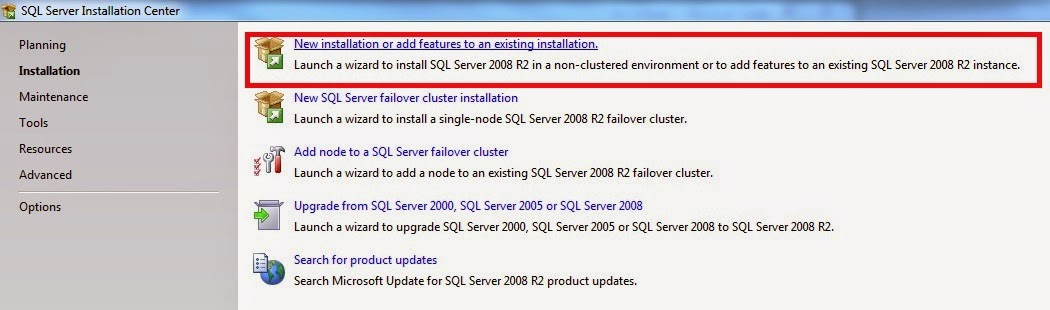
2.click on Installation


3.click on "New installation or add features to an existing installation" to install a fresh copy.


4.Click on "OK"


5.Select "Evaluation" from drop down and click on "NEXT"

6.Accept the licence agreement and click on "Next"


7.Click on "Install"


8.Click on "Next"


9.Select "SQL Server feature installation" radio button and click on "NEXT"


10.Click on "Select All" and click on "NEXT"


11.Click on "Next"


12.Select "Default Instance" and click on "Next"


13.Click on "Next"


14.Give "NT AUTHORITY\SYSTEM" for all account names and select startup type as
"Automatic"/"Manual" and click on "Next"

15.Select the "Mixed mode" and specify the password for default username "sa" and click on "Add Current User" and click on "Next"
16.Click on "Add Current User" and click on "Next"

17.Select the first radio button and click on "Next"


18.Click on "Next"
19.Click on "Next"

20.click on "Install"

21.installation is in progress
22.once the installation is successfull you will get below window then click on close it.

You are done with installation.

Thanks
GSV